


Latest post

Data Studio vs Mode

Comparing data tools takes time, but it doesn't have to. We've put Data Studio and Mode side by side, from the companies behind them to their features, pricing and privacy, so you can decide which one is right for your team.

Jump to features

Why you might be here

  • You're weighing up Data Studio against Mode and want to see which fits how your team works with data.
  • You need to know what each will cost as your team grows, and which features sit behind higher plans.
  • You care where your data is hosted and how the AI features handle it.
  • You want to know who's behind each product and who it's built for.

Company overviews

Who's behind each product, which company sizes and teams they're built for, and where they stand in the market.

Google's free report and dashboard builder, popular for marketing data from Google Ads, Analytics and Sheets. Renamed from Looker Studio back to Data Studio in April 2026; a paid Pro edition adds team workspaces and support.

Company

Founded
1998
Headquarters
Mountain View, US
Founders
Not public
Team size
~180,000 (Alphabet)
Funding
Not public
Ownership
Public (Alphabet, NASDAQ: GOOGL)

Company size

  • Entrepreneurs
  • Small business
  • Medium business
  • Enterprise

Built for

  • Marketing & Growth
  • Agencies & Consultants
  • Data Analysts
Also used by 3 other roles
  • Executives & Founders
  • Sales & RevOps
  • Students & Researchers

Market position

Strengths

  • Free with no seat limits
  • Best-in-class for Google marketing data
  • Easy sharing and embedding

Weaknesses

  • Slow with large or blended datasets
  • Non-Google sources often need paid third-party connectors
  • Limited governance and analysis depth
Analyst-focused tool combining a SQL editor, Python and R notebooks and a visual explorer, with reports and dashboards for sharing. Owned by ThoughtSpot since 2023 and still sold as a standalone product.

Company

Founded
2013
Headquarters
San Francisco, US
Founders
Derek Steer Co-founderBenn Stancil Co-founderJosh Ferguson Co-founder
Team size
51-200 (LinkedIn)
Funding
~$83M before acquisition
Ownership
Acquired by ThoughtSpot for $200M (2023)

Company size

  • Entrepreneurs
  • Small business
  • Medium business
  • Enterprise

Built for

  • Data Analysts
  • Data Scientists
  • Analytics Engineers
Also used by 3 other roles
  • Product
  • Finance
  • Executives & Founders

Market position

Strengths

  • Long-established SQL-first workflow analysts know
  • SQL, Python and R in one report
  • Free Studio plan for individuals

Weaknesses

  • Paid pricing hidden behind sales
  • Future direction tied to ThoughtSpot's roadmap
  • AI features lag newer AI-native tools

AI-native analytics workspace: connect databases, warehouses, apps like HubSpot and Stripe, Google Sheets and files, then ask questions in chat, check the SQL, and turn answers into charts and shared dashboards. Built for EU businesses, with unlimited Viewers on paid plans and your own AI key.

Company

Founded
2027
Headquarters
Netherlands
Founders
Chris Pattison CEO & Founder
Team size
1-10
Funding
Bootstrapped
Ownership
Independent

Company size

  • Entrepreneurs
  • Small business
  • Medium business
  • Enterprise

Built for

  • Data Analysts
  • Finance
  • Sales & RevOps
  • Product
  • Executives & Founders
Also used by 7 other roles
  • Marketing & Growth
  • Operations
  • Customer Support
  • HR & People
  • Developers & Engineering
  • Analytics Engineers
  • Agencies & Consultants

Market position

Strengths

  • Chat to dashboard across databases, apps like HubSpot and Stripe, and files in one place
  • Per-workspace pricing with unlimited Viewers
  • EU-focused, with your own AI key and visible SQL

Weaknesses

  • No SOC 2 or ISO 27001 yet
  • New product with a small team
  • No Python or notebook analysis

Features and functionality

The features buyers ask about most. Hover a feature name for a short definition.

Feature Data Studio Mode DataMaus
Ask questions in plain language (opens in a new tab) Higher plansGemini features in Pro PartlyAI Assist; plan availability not published YesChat agent on Standard and Advanced presets
AI writes SQL (opens in a new tab) No YesAI Assist YesSQL is visible and editable
AI builds charts and dashboards Higher plansGemini-assisted in Pro Partly YesCreates visualizations and dashboards, with approvals for changes
Bring your own AI key (opens in a new tab) No No YesOwn OpenAI key on paid plans; Claude planned post-launch
SQL editor (opens in a new tab) PartlyCustom SQL for BigQuery and some databases YesCore product YesQuery editor with typed filters
No-code querying (opens in a new tab) YesDrag-and-drop report builder PartlyAI Assist (plan availability not published) and Visual Explorer on query results YesVia AI chat and typed filters
Python or R No YesPython and R notebooks No
Notebooks (opens in a new tab) No Yes No
Spreadsheet interface (opens in a new tab) NoWorks closely with Google Sheets No No
Semantic layer (opens in a new tab) PartlyCalculated fields; Looker semantic layer connector PartlyDatasets; dbt integration YesData Context per data source: descriptions, business definitions and relationships for sources, tables and columns, used by the chat agent. Cross-source definitions planned.
Database and warehouse connectors (opens in a new tab) YesBigQuery, MySQL, Postgres and others Yes YesPostgreSQL, MySQL, MariaDB, Redshift, ClickHouse, BigQuery
App connectors (Stripe, HubSpot…) (opens in a new tab) YesGoogle Ads, Analytics, Search Console, YouTube plus 800+ partner connectors (often paid) No YesHubSpot, Stripe, Google Sheets; shared public data such as World Bank
CSV and Excel upload (opens in a new tab) YesCSV upload and Sheets Yes YesCSV and Excel, including in chat
Scheduled refresh (opens in a new tab) YesData freshness settings Higher plansSchedules on Pro YesScheduled and view-triggered query refresh; daily sync for Stripe and HubSpot
Dashboards (opens in a new tab) Yes YesReports and dashboards YesDashboard editor with widget interactions
Alerts and subscriptions (opens in a new tab) YesScheduled email delivery Higher plansEmail and Slack sharing on Pro YesAlerts and email subscriptions arriving before the 2027 launch
Public sharing links (opens in a new tab) Yes Higher plansExternal sharing add-on YesPublished dashboards and visualizations with chosen audiences
Embedding (opens in a new tab) YesEmbed reports Higher plansWhite-label embed add-on PartlyIndividual visualizations can be embedded; dashboard embedding not supported yet
Row-level security (opens in a new tab) PartlyVia data credentials and BigQuery row-level security Higher plansPermissioning on Pro PartlyPer-source read rights for members; not row-level
Version control (Git) (opens in a new tab) No YesGitHub sync No
API (opens in a new tab) PartlyLimited Data Studio API Higher plansAPI on Pro, admin API on Enterprise YesREST API v1 with OpenAPI contract

Pricing

List prices as published, in each vendor's own currency. Check the vendor's site before you buy.

Data Studio

Charged free; Pro per user per project, in USD.

  • Data Studio Free
  • Data Studio Proper user per project/month $9

Free plan: Free for creating and viewing reports

Trial: Pro trial via Google Cloud

See current pricing

Mode

Charged custom pricing (sales-led), in USD.

  • Studioup to 3 users Free
  • Pro Custom
  • Enterprise Custom

Free plan: Studio: free for individual analysts, up to 3 users, 10 MB per query

Trial: Not stated

See current pricing

DataMaus

Charged per workspace, in EUR excluding VAT. Unlimited Viewers on every plan.

  • Individualper workspace/month €60
  • Teamper workspace/month €250
  • Businessper workspace/month €750
  • Enterprise Custom

Free plan: None

Trial: 14 days with 100 AI credits, no card needed

See current pricing

Platforms, privacy and support

Where each product runs, where it keeps your data, and how you get help.

Feature Data Studio Mode DataMaus
Web app Yes Yes Yes
Desktop apps None None None
Mobile Browser only Browser only iOS and Android (responsive web)
Self-hosting (opens in a new tab) NoCloud only NoCloud only NoCloud only
Interface languages 37 English only 3English, Dutch, Spanish
AI chat languages Not confirmed Not confirmed Chat works in most languages (LLM-based)
Hosting regions (opens in a new tab) Google global infrastructure Not confirmed EU (Render app hosting, Scaleway object storage in Amsterdam)
EU data residency (opens in a new tab) No Not confirmed Yes
Certifications (opens in a new tab) SOC 1/2/3, ISO 27001, GDPR Not confirmed; security whitepaper only GDPR, CCPA
Data processing agreement (opens in a new tab) Yes Not confirmed Yes
Single sign-on (SSO) (opens in a new tab) Yes Higher plans Higher plans
SCIM provisioning (opens in a new tab) Not confirmed Not confirmed Higher plans
Audit logs (opens in a new tab) Higher plans Not confirmed Higher plans
AI and your data (opens in a new tab) Gemini features under Google Cloud terms (Pro). Not confirmed Uses the workspace's own OpenAI key; keys never enter prompts, history or analytics. Live databases are queried, not fully ingested.
Channels help center, community docs, community, email, in-app chat email (support@datamaus.com), Slack, Teams or Discord, live chat with the in-app assistant, which knows the whole app
Response times Community only on free; Google Cloud support on Pro Not confirmed 3-day response on most plans; 1-day response on Enterprise
Premium support Pro Standard on Pro, premium on Enterprise Enterprise

Screenshots

What each product looks like in use, from the vendors' own documentation.

Data Studio

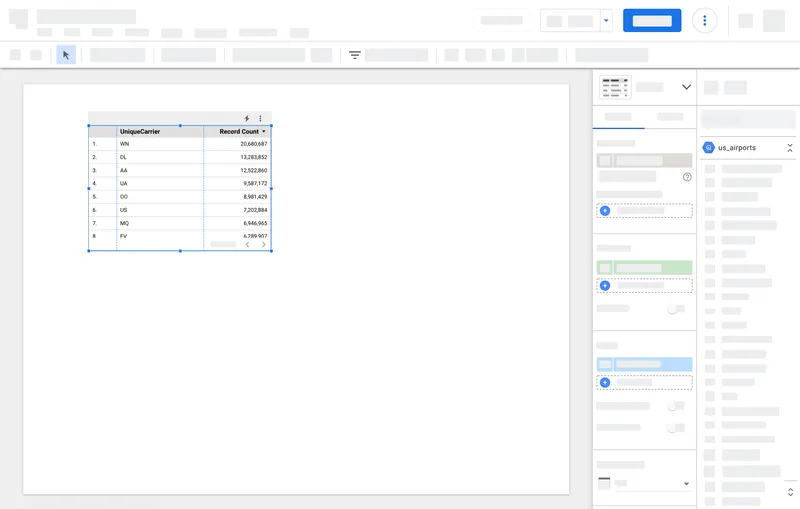
Data Studio: Report editor with data panel
Report editor with data panel
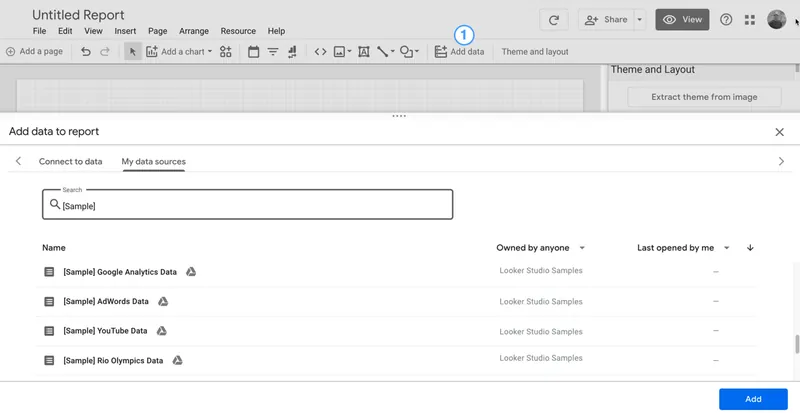
Data Studio: Adding data to a report
Adding data to a report

Mode

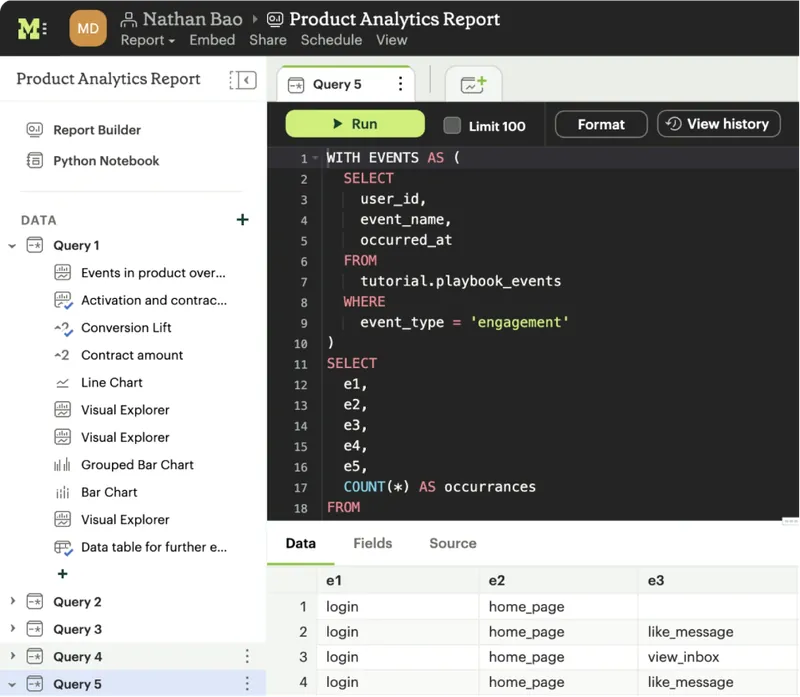
Mode: SQL editor with report builder
SQL editor with report builder
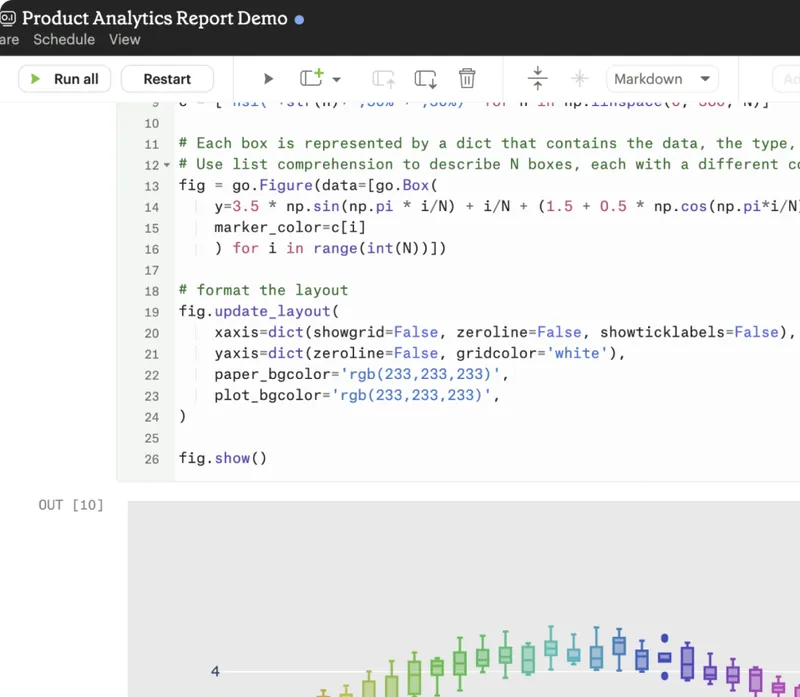
Mode: Python notebook
Python notebook

DataMaus

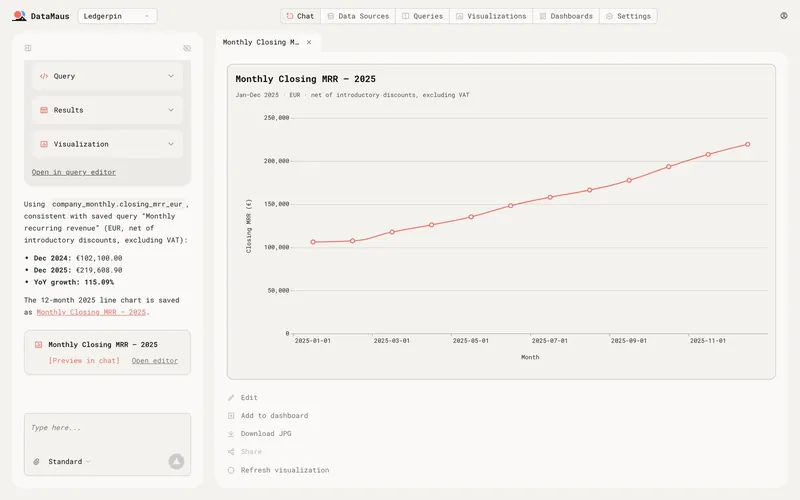
DataMaus: Chat answer with the queries it ran and the chart it saved
Chat answer with the queries it ran and the chart it saved
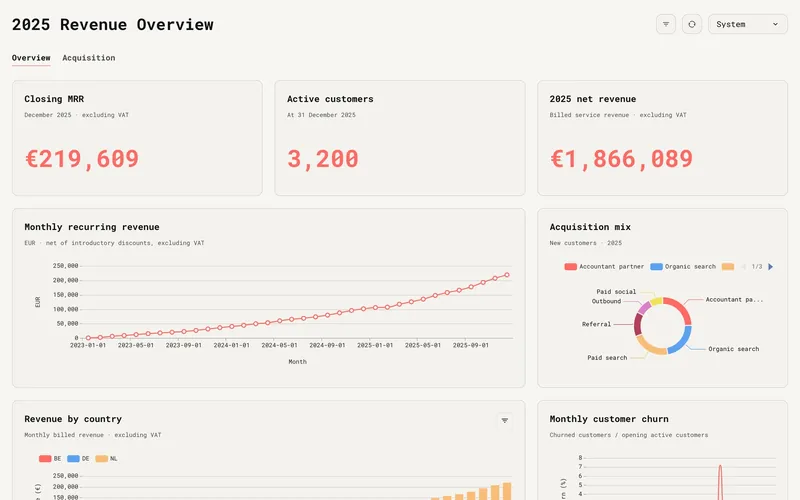
DataMaus: Dashboard with KPIs, charts and a reporting-period filter
Dashboard with KPIs, charts and a reporting-period filter

Not sure either fits?

See how DataMaus stacks up against both. We'll add it to every section of this comparison.

Still weighing up your options?

Start a 14-day trial of DataMaus and see what it can do with your own data. 100 AI credits included, no card needed.